What Is SAML and How Does It Work with EMS?
SAML, Security Assertion Markup Language, is an open standard for exchanging authentication and authorization data between an identity provider and a service provider. The information in this topic provides general information about SAML and how SAML works with EMS Platform Services.
- What Is SAML?
- SAML Terminology
- SAML Authentication Process
- SAML Initiation: SP-Initiated and IdP-Initiated
See Also:
- SAML Authentication
- Configure Platform Services in the Admin Portal
What Is SAML?
Security Assertion Markup Language (SAML) is a standard for exchanging authentication and authorization data between an identity provider (IdP) and a service provider (SP). SAML is the link between the authentication of a user’s identity and the authorization to use a service, such as EMS Web App or EMS Mobile App. SAML provides the following authentication and authorization benefits:
- Single Sign On – Users can log onto multiple services with the same credentials
- Access Control – Verifies that users have permission to access a particular service or perform a specific function in a service
- Federated Identity – One organization authenticating with credentials from a different organization (linking and storing a user's identity across different identity management systems)
Most organizations already know the identity of their users because users are logged into their organization's domain or intranet. Through SAML, organizations can make further use of their users' identity information and log users into other web-based applications, such as EMS Web App and EMS Mobile App.
SAML Terminology
The following are common terms used with SAML:
- Service Provider
- Identity Provider
- User Agent
- SAML Assertion
- SAML Binding Types
- RelayState Parameter
Service Provider
A SAML service provider (SP) is a system entity that receives and accepts authentication assertions. For EMS, the SP is EMS Platform Services because it generates SAML requests and receives and validates SAML responses. To grant users access to EMS Web App or EMS Mobile App, EMS Platform Services needs the user authentication from the Identity Provider.
Identity Provider
A SAML identity provider (IdP) is a system entity that issues authentication assertions. IdPs, such as AD FS and Azure, authenticate user login credentials and then send that authentication data (SAML assertions) to EMS Platform Services along with the users' access rights for EMS Web App or EMS Mobile App. The IdP application is hosted elsewhere, not with EMS. EMS does not store or have access to user passwords.
For a list of IdPs that EMS has tested and supports, see Supported Identity Providers.
User Agent
For SAML, a user agent is the browser used to access an application (for example, using Google Chrome to access EMS Web App).
SAML Assertion
A SAML assertion is the XML document that the IdP sends to the SP. The SAML assertion contains the user authorization. In the SAML workflow, once the IdP has determined that the users are who they say they are and that the users have the right to access the content or services they are interested in, the IdP sends a SAML assertion to the Service Provider (EMS Platform Services). A SAML assertion may be encrypted for increased security.
SAML Binding Types
SAML Service Providers and Identity Providers communicate by exchanging messages (requests and responses).
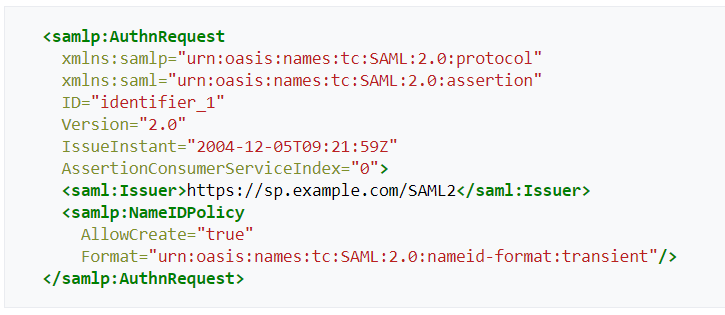
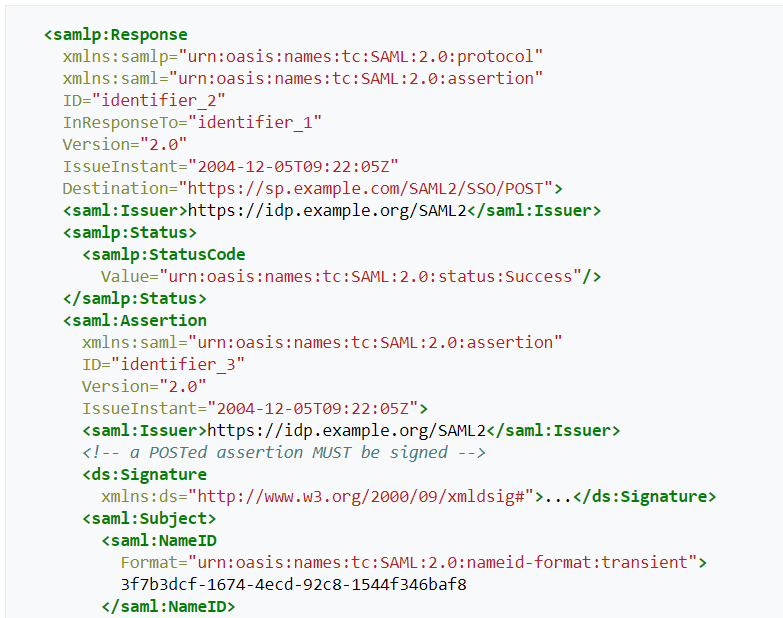
A binding defines how these messages are sent. There are two SAML binding types: HTTP Redirect and HTTP POST. EMS currently only supports HTTP Redirect binding. EMS does not support HTTP POST binding.
Although EMS does not support HTTP POST binding, customers with custom applications can use the HTTP POST binding type as long as they properly set up their SAML configuration.
HTTP Redirect Binding
An HTTP redirect binding encodes the SAML message directly in the URL query string of an HTTP GET request. Since the length of URLs is limited, customers need to be aware of the length of the URL. If a configuration creates a request that is very large, then the URL could be too long and cause errors in applications. This URL length issue is sometimes seen with AD FS and older versions of Internet Explorer.
For example, if using the HTTP redirect binding, the previous example SAML request would be encoded into a URL query string as shown in the following example:
Example of HTTP Redirect Binding

RelayState Parameter
The RelayState parameter is an extra component in the redirect binding URL, or an extra input type in the POST binding, that recalls where the user was when the EMS Platform Services (service provider) determined the user was unauthenticated and sent the user to the IdP. Once the user is authenticated by the IdP, the IdP can use the RelayState parameter to send the user back to the location (such as a page in EMS Web App) where the user was taken from for authentication.
In the SAML specification for EMS Platform Services, the RelayState parameter is a destination URL. If an IdP requires the RelayState parameter for configuration, use the EMS Platform Services URL, either the base or full URL, depending on the IdP requirements:
- Base URL – https://mycompany.com/EmsPlatform
- Full URL – https://mycompany.com/EmsPlatform/api/v1/authentication/saml
EMS does not support IdP-initiated SAML. If you use IdP-initiated SAML, you will receive an error if the RelayState parameter is configured with the EMS Platform Services URL. See SAML Initiation for more information.
SAML Authentication Process
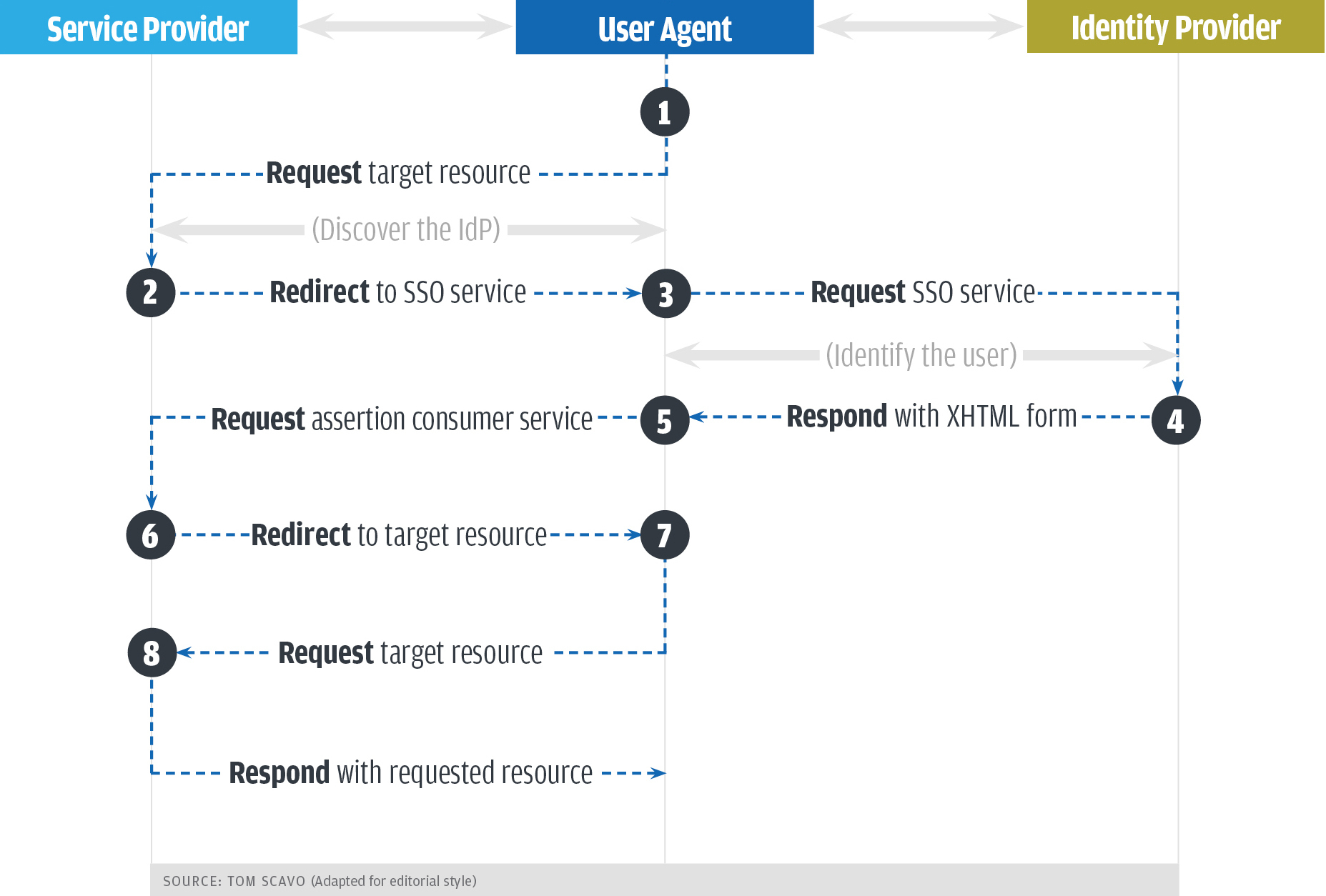
The SAML authentication process consists of SAML requests and responses being passed between a service provider (SP), identity provider (IdP), and user agent (user's browser). The following diagram provides an example of the SAML authentication process as a workflow. For EMS, the SP is EMS Platform Services.
SAML Workflow Diagram
The following diagram is an example of the SAML authentication process. For a detailed description of the steps show in this diagram, refer to the following section, SAML Workflow Description.
SAML Workflow Example
The following steps are an example workflow of the SAML authentication process (the numbers below correspond to numbers in the previous diagram). In the example, a user is trying to access the EMS Web App, which is the target resource in the previous diagram. The service provider is EMS Platform Services, and the user agent is the user's browser.
- The user tries to access a target resource, such as EMS Web App.
The user's browser (user agent) requests access through EMS Platform Services (service provider). EMS Platform Services verifies whether the user is already authenticated within the system. If the user is authenticated, the user goes on to step 7. If the user is unauthenticated, EMS Platform Services starts the authentication process (step 2).
- EMS Platform Services determines the appropriate IdP for the user and then redirects the user to the IdP's single sign-on service (SSO).
- The user's browser sends an authentication request to the IdP's SSO service, and the SSO service identifies the user.
- The IdP's SSO service returns an XHTML form to the browser with a SAML response that contains the authentication assertion and any additional attributes.
- The browser passes the SAML response on to EMS Platform Services.
- EMS Platform Services processes and validates the SAML response and creates a security context for the user (basically, logs the user in) and then redirects the user back to EMS Web App.
- After following the redirect, the browser requests access to EMS Web App again.
- The user is logged in and can access EMS Web App.
SAML Initiation
There are two ways to initiate the SAML process: SP-initiated and the IdP-initiated. EMS only supports SP-initiated SAML.
In the SP-initiated workflow, the user initiates the login process at the SP. For example, a user tries to access EMS Web App and is not authenticated. EMS Platform Services redirects the user to the IdP with a SAML request (AuthnRequest). The SAML request contains the necessary information for the IdP to authenticate the user and reply to EMS Platform Services with the correct SAML Assertion (SAMLResponse).
The SAML workflow diagram is an example of the SP-initiated method because the user starts the process by first going to EMS Web App (target resource) and EMS Platform Services (SP).